Complete Guide to Electronic eFiling Court Records in Lake County, Florida
Introduction to the Lake County Clerk’s Office and Electronic Filing Systems
The Lake County Clerk of the Circuit Court and Comptroller serves as a vital governmental office responsible for maintaining court records, processing legal documents, and ensuring public access to judicial information. In the modern era of digital transformation, the Lake County Clerk’s Office has embraced technological advancement through the implementation of electronic filing systems, commonly known as eFiling. This comprehensive guide explores every aspect of the eFiling court records system available through the Lake County Clerk’s Office, providing detailed information about registration processes, system capabilities, training resources, and practical guidance for both legal professionals and self-represented litigants.
The transition to eFiling represents a significant shift in how court documents are submitted, processed, and managed within the Florida judicial system. The Lake County Clerk’s Office participates in the statewide Florida Courts E-Filing Portal, which serves as a centralized platform connecting thousands of users to the court system across the state. This integration ensures consistency, efficiency, and accessibility in court document management while maintaining the security and integrity of legal records.
Understanding the Florida Courts E-Filing Portal
What is the Florida Courts E-Filing Portal?
The Florida Courts E-Filing Portal, accessible at www.myflcourtaccess.com, functions as a single, statewide access point that connects thousands of users to Florida’s court system. This sophisticated eFiling platform enables registered users to file their cases at any time, providing 24/7 accessibility that revolutionizes the traditional court filing process. The portal serves as the primary mechanism through which the Lake County Clerk’s Office accepts electronic court filings, making it an essential tool for anyone engaging with the Lake County court system.
The eFiling portal has fundamentally transformed how legal documents are submitted and processed. Rather than requiring physical presence at the courthouse or reliance on traditional mail services, the portal allows users to submit documents from anywhere with internet connectivity. This convenience factor has proven particularly valuable for attorneys managing multiple cases across different jurisdictions and for self-represented litigants who may face transportation or scheduling challenges.
Key Features and Benefits of the eFiling System
The eFiling system offers numerous advantages that enhance the efficiency and accessibility of court proceedings in Lake County:
24/7 Availability and Accessibility The portal operates continuously, allowing users to file documents at any time that suits their schedule. This round-the-clock availability eliminates the constraints of traditional business hours and provides flexibility for legal professionals and litigants alike.
Batch Filing Capabilities One of the most powerful features of the eFiling system is its ability to process batch filings. This functionality enables attorneys and self-represented litigants to file multiple documents simultaneously, significantly reducing the time required for case management. For legal practices handling high volumes of cases, this batch processing capability translates to substantial time savings and increased productivity.
Geographic Flexibility The eFiling portal eliminates the need for physical presence at the courthouse. Users can upload documents from the convenience of their homes, offices, or any location with internet access. This geographic flexibility has proven particularly beneficial during times when courthouse access may be limited or when filers are located outside of Lake County.
Cost Efficiency The portal provides a free-to-use service for filing documents, requiring only the payment of standard court fees plus minimal payment processing fees. According to available data, the eFiling system has saved filers an estimated $38 million in postage costs by eliminating the need to mail, ship, or courier documents to the courthouse.
Comprehensive User Network The eFiling portal connects a vast network of participants in Florida’s justice system, including more than 220,000 self-represented litigants, 82,000 attorneys, 1,400 judges, and numerous other court personnel. This extensive network facilitates seamless communication and document exchange throughout the judicial process.
Registration Process for eFiling Access
Creating Your eFiling Account
To utilize the eFiling system for Lake County court records, users must first complete the registration process through the Florida Courts E-Filing Portal. The registration procedure is designed to be straightforward while maintaining appropriate security measures to protect sensitive legal information.
Step-by-Step Registration Guide:
Step 1: Access the Portal Navigate to the Florida Courts E-Filing Portal website at www.myflcourtaccess.com. The website is optimized for use with Internet Explorer 11 and above, Mozilla Firefox, and Google Chrome browsers.
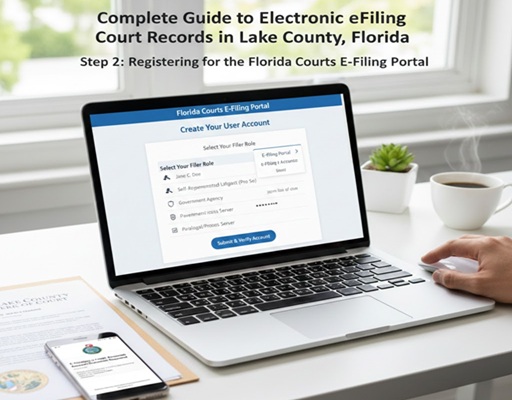
Step 2: Select Your Filer Role Upon accessing the portal, users must select their appropriate filer role from the dropdown menu. For individuals representing themselves in court, it is crucial to select “Self-Represented Litigant” as the filer role. Attorneys must select the appropriate attorney role and provide their Florida Bar Number.
Step 3: Complete Required Information The registration form requires completion of all fields marked with a red asterisk, indicating mandatory information. For attorneys, the Florida Bar Number is a required field. All users must create a username and password that meets specific security requirements: the password must be between six and sixteen characters and contain at least one number.
Step 4: Security Question Setup Users must select a security question from the dropdown menu and provide an answer. This security question will be used for account verification purposes, particularly during the activation process.
Step 5: Contact Information At minimum, users must enter their first and last name along with a primary email address. The portal allows for up to three email addresses to be entered, and all notifications will be sent to each listed email address. For attorneys seeking quick automated approval, the name used during registration must match exactly with the name listed with The Florida Bar. Discrepancies may result in manual approval processes that could delay account activation.
Step 6: Account Activation Upon completing registration, users will receive two separate email notifications. The first confirms successful registration and provides profile information. The second contains an activation link that must be clicked to complete the account setup process. Users will need to know the answer to their security question to activate their account.
Important Registration Considerations
Email Management It is essential to ensure that emails from @myflcourtaccess.com are not directed to spam or junk folders. Users should add this domain to their approved sender list to guarantee receipt of important notifications regarding their eFiling activities.
Browser Compatibility While the portal supports multiple browsers, users should ensure they are using current versions of Internet Explorer 11 or above, Mozilla Firefox, or Google Chrome for optimal performance.
Mobile Device Limitations Users should note that while email notifications can be received on smartphones or tablets, the actual eFiling process cannot be completed using these mobile devices. A desktop or laptop computer is required for document submission.
Preparing Documents for eFiling
Document Format Requirements
Successful eFiling requires careful attention to document formatting and preparation. The Lake County Clerk’s Office, through the Florida Courts E-Filing Portal, accepts documents in specific formats to ensure compatibility and readability.
Accepted File Formats:
-
Microsoft Word 97 or higher versions
-
WordPerfect
-
Adobe PDF (Portable Document Format)
Critical Preparation Steps:
Document Completion and Signature Before initiating the eFiling process, all documents must be fully completed, signed, and notarized as required by the specific legal form or pleading. Incomplete or improperly executed documents may be rejected by the court.
Metadata Removal Users should be aware that documents may contain metadata—hidden information such as track changes, comments, or previous versions—that should be removed before filing. The Florida Courts E-Filing Portal provides resources and guidance on removing metadata from Word documents.
PDF/A Compliance For documents filed as PDFs, compliance with PDF/A standards may be required. This archival format ensures long-term preservation and accessibility of electronic documents.
Special Considerations for Proposed Orders
An important limitation exists regarding the submission of proposed orders in Lake County. Unlike some other counties in the Fifth Judicial Circuit, Lake County does not accept proposed orders via the E-Filing Portal at this time. This restriction means that attorneys and litigants must follow alternative procedures for submitting proposed orders to the court.
For counties that do accept proposed orders electronically (such as Citrus, Hernando, Marion, and Sumter), specific formatting requirements apply:
-
Proposed orders must be submitted in Word format (.docx) only
-
Word Perfect, Word 97, or PDF documents are not accepted for proposed orders
-
Specific coding requirements must be followed as outlined in submission guidelines
The eFiling Process: Step-by-Step Submission
Filing to a New Case
When initiating a new legal action in Lake County through the eFiling system, users should follow these detailed steps:
Step 1: Login to the Portal Access the Florida Courts E-Filing Portal using your registered username and password.
Step 2: Select Filing Type Choose the option to file to a new case. This selection will initiate the case creation process.
Step 3: Enter Case Information Provide all required case information, including case type, party names, and other relevant details. The portal will guide users through the specific information required for different types of cases.
Step 4: Upload Documents Select and upload the documents to be filed. Ensure all documents are in accepted formats and have been properly prepared as outlined in the preparation section.
Step 5: Review and Submit Carefully review all entered information and uploaded documents before submission. The portal provides opportunities to verify accuracy and completeness.
Step 6: Fee Payment Pay required court fees through the portal’s secure payment system. The system accepts various payment methods and provides confirmation of payment processing.
Step 7: Confirmation Upon successful submission, users will receive confirmation emails documenting the filing. These confirmations should be retained for record-keeping purposes.
Filing to an Existing Case
For documents related to cases already initiated, the eFiling process follows a similar pattern with some modifications:
Step 1: Case Identification Enter the existing case number to locate the case in the portal system.
Step 2: Document Classification Select the appropriate document type from the available categories. Proper classification ensures correct routing and processing by court personnel.
Step 3: Party Identification Confirm or update party information as necessary for the specific filing.
Step 4: Document Upload and Submission Upload the relevant documents and complete the submission process, including any required fee payments.
Training and Educational Resources
Comprehensive Training Video Library
The Florida Courts E-Filing Authority provides an extensive collection of training videos designed to help users navigate the eFiling system effectively. These resources are invaluable for both new users and those seeking to enhance their understanding of specific portal features.
Videos for Self-Represented Litigants:
-
Self-Represented Litigant Account Request (5 minutes) – Guides users through the registration process specifically tailored for individuals representing themselves
-
Self-Represented Litigant DIY Documents in the Portal (6 minutes) – Explains how to work with do-it-yourself document features
-
Self-Represented Litigant Filing to a New Case (12 minutes) – Comprehensive guide to initiating new cases through eFiling
-
Self-Represented Litigant Filing to an Existing Case (7 minutes) – Instructions for adding documents to ongoing cases
General Instructional Videos:
-
The Florida Courts E-Filing Portal Overview (17 minutes) – Comprehensive introduction to portal capabilities
-
Portal Help Menu Navigation (3 minutes) – Guide to utilizing help resources within the system
-
Register for an Account (3-4 minutes) – Step-by-step registration walkthrough
-
Setting Profile Preferences (9 minutes) – Customizing user account settings
-
My Submissions (5 minutes) – Tracking and managing submitted documents
-
My Cases (7 minutes) – Case management and organization tools
-
Filing to a New Case (15 minutes) – Detailed new case filing procedures
-
Filing a Pleading to an Existing Case (10 minutes) – Document submission for ongoing litigation
-
Fees and Payments (4 minutes) – Understanding and processing court fees
-
Creating the E-Service List (7 minutes) – Managing electronic service of documents
-
Correction Queue (4 minutes) – Handling rejected or corrected filings
-
Removing Metadata from Word Documents (2 minutes) – Technical preparation guidance
-
The New Civil Cover Sheet (4 minutes) – Updated form requirements
Additional Training Materials
Beyond video resources, the Florida Courts E-Filing Portal website provides various written materials and guides:
-
E-Filing Portal User Manual – Comprehensive documentation covering all aspects of portal use
-
Quick Reference Guides – Condensed instructions for common tasks
-
Document Submission Standards – Technical specifications for file preparation
-
E-Service User Guide – Detailed information on electronic service procedures
-
FAQs and Troubleshooting Resources – Answers to common questions and solutions to typical issues
Support and Assistance Resources
Technical Support Contacts
Users encountering technical difficulties with the eFiling system have access to multiple support channels:
Florida Courts E-Filing Portal Support:
-
Help Desk Line: (850) 577-4609
-
Email Support: Available through the portal’s support request system
-
Online Support Requests: Submit tickets through the portal website
Lake County Clerk’s Office: For questions specific to Lake County procedures or document status inquiries, users should contact the Lake County Clerk’s Office directly. Contact information is available through the official Lake County Clerk website at www.lakecountyclerkfl.gov.
Social Media and Online Resources
The Florida Courts E-Filing Authority maintains active communication channels to keep users informed about system updates, maintenance windows, and new features:
-
Twitter: @FLCourtsEFiling – Follow for announcements about software releases, training materials, and system maintenance schedules
-
YouTube Channel: Florida Courts E-Filing Portal – Access to all training videos and instructional content
-
Website Updates: Regular updates to training manuals and documentation at www.myflcourtaccess.com

Online Court Records Access in Lake County
Court Records Search Capabilities
Beyond eFiling functionality, the Lake County Clerk’s Office provides comprehensive online access to court records through dedicated search portals. These systems enable users to access case information, view court documents, and track case activity remotely.
Available Records: The Lake County Clerk’s Office maintains various categories of court records accessible online:
-
Civil case records
-
Criminal case records
-
Family law cases
-
Traffic citations and records
-
Probate matters
-
Small claims cases
Access Portal: Users can search online court records through the dedicated portal at courtrecords.lakecountyclerk.org. This system requires user registration and provides different levels of access based on user roles and case relationships.
Records Access Features
Case Search Functionality The online records system enables users to search for cases using various criteria including case number, party names, or filing date ranges. This flexibility facilitates quick location of specific cases or broad research across case types.
Document Viewing and Download Authorized users can view and download court documents directly through the portal. This capability eliminates the need for physical visits to the courthouse to obtain copies of filed documents.
Court Events and Scheduling The system provides access to court event information, allowing users to track hearing dates, deadlines, and other important case milestones.
E-Notification Services Users can sign up for electronic notifications regarding case activity, ensuring timely awareness of new filings, scheduled hearings, or other case developments.
Important Policies and Procedures
Public Records and Privacy Considerations
The Lake County Clerk’s Office balances public access to court records with privacy protections required by law. While many court records are public documents, certain information may be restricted or redacted to protect sensitive personal data.
Redaction Requirements Users should be aware that certain personal information, such as Social Security numbers, financial account numbers, and minor children’s names, should be redacted from documents before eFiling when not essential to the legal proceedings.
Confidential Cases Some case types, such as juvenile matters, mental health proceedings, and certain family law cases, may have restricted access. The eFiling system and online records portals enforce these access restrictions appropriately.
Fee Schedules and Payment Processing
Court Filing Fees Standard court filing fees apply to documents submitted through the eFiling system. These fees vary based on case type and document nature. The portal provides current fee information during the submission process.
Payment Processing Fees In addition to court fees, minimal payment processing fees are charged for electronic transactions. These fees cover the costs of secure payment processing services.
Fee Exemptions Certain filers may qualify for fee exemptions or waivers based on financial hardship or statutory provisions. Information about fee exemption procedures is available through the Lake County Clerk’s Office.
Best Practices for Successful eFiling
Pre-Submission Checklist
To ensure successful eFiling and avoid common rejection reasons, users should verify the following before submission:
Document Preparation:
-
[ ] All documents are complete and fully executed
-
[ ] Required signatures and notarizations are included
-
[ ] Documents are saved in accepted file formats
-
[ ] Metadata has been removed from Word documents
-
[ ] File sizes comply with portal limitations
-
[ ] Document text is searchable (for PDFs) rather than scanned images when possible
Case Information:
-
[ ] Correct case number is entered for existing cases
-
[ ] Party names are spelled correctly and match court records
-
[ ] Case type is accurately selected
-
[ ] All required fields are completed
Technical Verification:
-
[ ] Stable internet connection is available
-
[ ] Browser is compatible and up-to-date
-
[ ] Adequate time is available to complete the process without interruption
-
[ ] Payment method is ready for fee processing
Post-Submission Procedures
Confirmation Review Upon completing an eFiling, carefully review all confirmation emails and documents. Verify that the correct documents were filed and that case information is accurate.
Record Retention Maintain copies of all filed documents, confirmation receipts, and payment records. These materials serve as proof of filing and may be needed for future reference.
Follow-up Monitoring Regularly check the email addresses associated with the eFiling account for notifications regarding filing status, corrections needed, or court responses.
Troubleshooting Common eFiling Issues
Registration and Login Problems
Account Activation Delays If account activation is delayed beyond normal timeframes, verify that:
-
The activation email was not directed to spam folders
-
The security question answer was entered correctly during activation
-
For attorneys, the Florida Bar number and name match exactly with Bar records
Password Reset Procedures Users who forget passwords can utilize the portal’s password reset function, which requires the security question answer established during registration.
Document Upload Failures
File Format Issues If documents fail to upload, verify:
-
The file format is among those accepted (Word, WordPerfect, PDF)
-
The file is not corrupted and can be opened locally
-
The filename does not contain special characters that may interfere with processing
File Size Limitations Large files may encounter upload limitations. Consider compressing documents or splitting large filings into logical segments when permitted by court rules.
Payment Processing Errors
Transaction Failures If payment processing fails:
-
Verify credit card information is entered correctly
-
Ensure sufficient funds or credit limit availability
-
Check that the billing address matches card records
-
Consider alternative payment methods if available
Future Developments and System Enhancements
The eFiling system continues to evolve with technological advancements and changing user needs. The Florida Courts E-Filing Authority regularly implements updates to improve functionality, security, and user experience.
Anticipated Improvements:
-
Enhanced mobile accessibility
-
Improved integration with case management systems
-
Expanded self-help resources for self-represented litigants
-
Advanced search and reporting capabilities
-
Streamlined payment processing options
Users should monitor official communications from the Florida Courts E-Filing Authority and the Lake County Clerk’s Office for announcements regarding system updates and new features.
Frequently Asked Questions (FAQ) About eFiling in Lake County
General eFiling Questions
Q1: What is eFiling and why is it required? A: eFiling (electronic filing) is the process of submitting court documents through a secure online portal rather than physically delivering paper documents to the courthouse. The State of Florida has mandated eFiling to improve efficiency, reduce costs, and streamline court operations. The Florida Courts E-Filing Portal at www.myflcourtaccess.com serves as the centralized system for eFiling in Lake County and throughout Florida.
Q2: Is eFiling mandatory for all case types in Lake County? A: Yes, eFiling is mandatory for most case types in Lake County, Florida. Attorneys are required to file electronically, and self-represented litigants are strongly encouraged to use the eFiling system. Certain exemptions may apply in specific circumstances, but the vast majority of court documents must be filed electronically.
Q3: What are the costs associated with eFiling? A: The eFiling portal itself is free to use. However, users must pay all standard court filing fees associated with their documents, plus minimal payment processing fees for electronic transactions. These costs are comparable to traditional filing methods but eliminate expenses related to travel, postage, and courier services.
Registration and Account Management
Q4: How do I register for an eFiling account? A: To register for eFiling access:
-
Visit www.myflcourtaccess.com
-
Click on “E-Filing Portal” or “Log In Now!”
-
Select your filer role (choose “Self-Represented Litigant” if representing yourself)
-
Complete all required fields marked with red asterisks
-
Create a secure password (6-16 characters with at least one number)
-
Set up your security question
-
Submit registration and activate your account via the email link sent to you
Q5: What if my name doesn’t match Florida Bar records during attorney registration? A: If you are an attorney and your registration name doesn’t exactly match your Florida Bar listing, your account will require manual approval rather than automatic activation. This may cause delays in account activation. Ensure your registration name matches your Bar record exactly to avoid delays.
Q6: Can I have multiple email addresses associated with my eFiling account? A: Yes, the portal allows you to enter up to three email addresses. All notifications regarding your eFiling activities will be sent to each listed email address, ensuring you don’t miss important communications.
Q7: How do I reset my password if I forget it? A: Use the password reset function on the portal login page. You will need to answer your security question correctly to reset your password. If you encounter difficulties, contact the portal help desk at (850) 577-4609.
Document Preparation and Submission
Q8: What file formats are accepted for eFiling? A: The Florida Courts E-Filing Portal accepts documents in the following formats:
-
Microsoft Word 97 or higher (.doc, .docx)
-
WordPerfect
-
Adobe PDF (.pdf)
Q9: Do my documents need to be signed before eFiling? A: Yes, all documents must be fully completed, signed, and notarized (if required) before eFiling. The system does not provide electronic signature capabilities—you must execute documents properly before scanning or converting them for electronic submission.
Q10: How do I remove metadata from my Word documents before filing? A: The Florida Courts E-Filing Portal provides a training video specifically addressing metadata removal (2 minutes duration). Generally, you should use the “Inspect Document” feature in Microsoft Word to remove hidden text, track changes, comments, and other metadata before saving your final version for eFiling.
Q11: Can I file proposed orders through the eFiling portal in Lake County? A: No, Lake County does NOT accept proposed orders via the E-Filing Portal. This is an important limitation specific to Lake County within the Fifth Judicial Circuit. Other counties in the circuit (Citrus, Hernando, Marion, and Sumter) do accept proposed orders electronically, but Lake County requires alternative submission methods.
Technical Issues and Support
Q12: What browsers work best with the eFiling portal? A: The portal is optimized for Internet Explorer 11 and above, Mozilla Firefox, and Google Chrome. Ensure you are using current browser versions for optimal performance. Chrome, Firefox, or Edge are specifically recommended for best results.
Q13: Can I use my smartphone or tablet to eFile documents? A: No, while you can receive email notifications on smartphones and tablets, the actual eFiling process requires a desktop or laptop computer. Mobile devices do not support the document upload and submission functions.
Q14: What should I do if my document upload fails? A: If document upload fails:
-
Verify the file format is accepted
-
Check that the file isn’t corrupted by opening it locally
-
Ensure the filename doesn’t contain special characters
-
Try reducing file size if the document is very large
-
Clear your browser cache and try again
-
Contact technical support if problems persist
Q15: Who do I contact for technical support with the eFiling portal? A: For technical support:
-
Phone: (850) 577-4609
-
Email: Submit support requests through the portal website
-
Online: Submit help desk tickets via the portal’s support system
Case Management and Records Access
Q16: How do I search for my case after filing? A: You can search for cases through the Lake County Clerk’s online records portal at courtrecords.lakecountyclerk.org. You will need to register for access and can search by case number, party name, or other criteria.
Q17: Can I view documents filed by other parties in my case? A: Yes, authorized users can view documents filed by all parties in cases they have access to through the online records portal. This facilitates case monitoring and ensures all parties have access to the complete court record.
Q18: How do I receive notice of new filings in my case? A: The eFiling system provides automatic email notifications when documents are filed in cases you are associated with. Ensure your email addresses are current and check your spam folders regularly to receive these notifications.
Q19: Can I pay outstanding fines and fees through the eFiling system? A: Yes, the portal includes payment processing capabilities for court fees, fines, and costs associated with eFiling submissions. Various payment methods are accepted through the secure payment system.
Self-Represented Litigant Specific Questions
Q20: Do I need an attorney to use the eFiling system? A: No, the eFiling system is designed for use by both attorneys and self-represented litigants. When registering, simply select “Self-Represented Litigant” as your filer role. The portal provides specific training videos and resources tailored for individuals representing themselves.
Q21: What training resources are available for self-represented litigants? A: Several training videos are specifically designed for self-represented litigants:
-
Self-Represented Litigant Account Request (5 minutes)
-
Self-Represented Litigant DIY Documents in the Portal (6 minutes)
-
Self-Represented Litigant Filing to a New Case (12 minutes)
-
Self-Represented Litigant Filing to an Existing Case (7 minutes)
These videos are available on the Florida Courts E-Filing Portal website and YouTube channel.
Q22: Is there special support available for self-represented litigants? A: Yes, self-represented litigants can access dedicated support through:
-
Phone: (850) 577-4609
-
Training videos and manuals specifically created for pro se filers
Privacy and Security
Q23: Is my personal information secure in the eFiling system? A: Yes, the Florida Courts E-Filing Portal employs robust security measures to protect user information and document confidentiality. The system uses secure connections and follows established protocols for handling sensitive legal documents.
Q24: What personal information should I redact from documents before filing? A: Before eFiling, redact sensitive personal information that isn’t essential to your case, including:
-
Social Security numbers
-
Financial account numbers
-
Dates of birth (when not required)
-
Minor children’s full names (use initials when possible)
-
Driver’s license numbers
Q25: Who can access the documents I file electronically? A: Documents filed in public cases are generally accessible to the public through the court records system, subject to certain restrictions. Confidential case types (such as juvenile or mental health cases) have restricted access. Parties to the case have full access to documents filed in their cases.
System Availability and Maintenance
Q26: Is the eFiling portal available 24/7? A: Yes, the eFiling portal is available 24 hours a day, 7 days a week. However, occasional maintenance windows may temporarily limit access. Follow @FLCourtsEFiling on Twitter for maintenance announcements.
Q27: What happens if the system is down when I need to file a time-sensitive document? A: If you encounter system outages that prevent timely filing, document the issue and contact the Lake County Clerk’s Office immediately for guidance. In rare circumstances, alternative filing procedures may be authorized, but users should plan to file well in advance of deadlines to avoid such situations.
Q28: How do I stay informed about system updates and changes? A: Stay informed through:
-
Twitter: @FLCourtsEFiling
-
YouTube: Florida Courts E-Filing Portal channel
-
Website: Regular visits to www.myflcourtaccess.com
-
Email notifications from the portal regarding system changes
IN VIEW OF THE FACTS FINAL CONCLUSION
The eFiling system represents a transformative advancement in court operations for Lake County, Florida, providing unprecedented accessibility, efficiency, and convenience for legal professionals and self-represented litigants alike. Through integration with the Florida Courts E-Filing Portal at www.myflcourtaccess.com, the Lake County Clerk’s Office delivers modern, user-friendly services that streamline the filing process while maintaining the integrity and security of court records.
Success with eFiling requires understanding the registration process, document preparation requirements, and system capabilities outlined in this comprehensive guide. By utilizing the extensive training resources, following best practices, and accessing available support services, users can navigate the eFiling system with confidence and efficiency.
As technology continues to evolve, the eFiling system will undoubtedly expand its capabilities, further enhancing access to justice and improving court operations throughout Lake County and the State of Florida. Users are encouraged to remain engaged with official communications from the Florida Courts E-Filing Authority and the Lake County Clerk’s Office to stay current with system enhancements and new features.
For additional information, support, or clarification regarding eFiling procedures in Lake County, visit the official Lake County Clerk of the Circuit Court and Comptroller website at www.lakecountyclerkfl.gov or contact the office directly during business hours.
Important Website Links Mentioned in This Article:
-
Florida Courts E-Filing Portal: www.myflcourtaccess.com
-
Lake County Clerk of the Circuit Court: www.lakecountyclerkfl.gov
-
Lake County Court Records Search: courtrecords.lakecountyclerk.org
-
Florida Courts E-Filing Portal Authority: www.myflcourtaccess.com/authority/
-
Training Videos: Available through www.myflcourtaccess.com/authority/training-videos
For More Information Visit Home Click Here
DISCLAIMER
This article provides general information about the eFiling system in Lake County, Florida, based on publicly available resources and official government websites. Procedures and requirements may change, and users should always verify current information through official channels. For legal advice regarding specific cases or situations, consult with a qualified attorney.