Supreme Court Visitor Entry E-Pass Application and Issuance Procedure
Understanding India’s Apex Judicial Institution
The Supreme Court of India stands as the guardian of the Constitution and the highest judicial authority in the world’s largest democracy. Established on January 28, 1950, this magnificent institution has played a pivotal role in shaping India’s legal landscape, protecting fundamental rights, and ensuring justice reaches every corner of this diverse nation. Located at Tilak Marg in New Delhi, the Supreme Court complex is not merely a workplace for judges and lawyers—it represents the hopes and aspirations of over 1.4 billion people who look to it as the ultimate arbiter of justice.
For citizens, law students, researchers, and curious visitors, witnessing the Supreme Court in action offers invaluable insights into how India’s judicial machinery operates. However, unlike visiting a museum or a public park, entering the premises of India’s highest court requires proper authorization through a structured digital process. This comprehensive guide walks you through everything you need to know about planning your visit, from understanding the institution’s significance to successfully obtaining your electronic entry permit.
The Architecture and Atmosphere of Justice
Before diving into the procedural aspects, it’s worth appreciating what makes the Supreme Court complex special. The building itself is an architectural marvel that blends modern functionality with symbolic elements representing justice. The expansive corridors, the dignified courtrooms where landmark judgments are delivered, and the library housing countless legal treasures create an atmosphere that inspires respect for the rule of law. Visitors often describe the experience as humbling—a reminder of the gravity of judicial processes that affect millions of lives.
The court operates in a hierarchical structure with the Chief Justice of India at its helm, supported by distinguished judges who hear cases ranging from constitutional matters to civil disputes of national importance. When you visit, you might witness intense legal arguments, the careful consideration of constitutional questions, or the delivery of judgments that could reshape India’s legal framework. This is why controlled access through proper visitor management becomes essential—not to exclude citizens, but to maintain the sanctity and security of judicial proceedings.
Who Can Visit and Why
The Supreme Court welcomes various categories of visitors, each with distinct purposes. Law students frequent the premises to observe courtroom proceedings, learning advocacy skills by watching senior counsel present arguments before the bench. Researchers and academicians access the library resources to study landmark judgments and legal precedents. Journalists cover significant cases that capture national attention. Ordinary citizens, driven by curiosity or personal interest in specific cases, also form a significant portion of visitors.
Regardless of your background or purpose, everyone must follow the same fundamental requirement: obtaining prior permission through the official digital portal. This system, known as the E-Pass or electronic entry pass, represents the court’s adaptation to modern technology, making the process transparent, efficient, and accessible to people across India without requiring physical presence at the court gates for initial application.
The Digital Gateway: Understanding the E-Pass System
The Supreme Court has embraced digital transformation to streamline visitor access. The E-Pass system eliminates the need for standing in long queues, dealing with paperwork, or making multiple trips to the court complex for simple entry permissions. This online facility allows applicants to submit their details, specify their visit purpose, and receive approval digitally—all from the comfort of their homes or offices.
The official portal for this service is accessible at https://epasses.sci.gov.in/. This website serves as the single window for all visitor pass applications, ensuring that the process remains centralized, secure, and efficient. The interface is designed to be user-friendly, though first-time visitors might benefit from understanding the step-by-step workflow before initiating their application.
Step-by-Step Guide to Obtaining Your E-Pass
Initial Registration and Account Creation
Your journey begins with accessing the official portal. Upon visiting the website, you’ll encounter a clean interface prompting you to either log in or register as a new user. For first-time visitors, registration is mandatory. Click on the new user registration option, which will direct you to a form requiring basic personal information.
You’ll need to provide your full name exactly as it appears on your government-issued identity proof. The system accepts various identity documents including Aadhaar card, passport, voter ID, or driving license. Ensure that the details match perfectly, as discrepancies can lead to application rejection or entry denial at the security checkpoint. You’ll also need to provide a valid mobile number and email address—these serve as your primary contact points for receiving OTPs (One-Time Passwords), application status updates, and final pass confirmations.
During registration, create a strong password following the specified criteria, usually requiring a combination of uppercase letters, lowercase letters, numbers, and special characters. This password protects your account, so store it securely. After filling in all mandatory fields, submit the registration form. You’ll receive an OTP on your registered mobile number for verification. Enter this code to activate your account, completing the first crucial step.
Logging In and Navigating the Dashboard
Once registered, return to the main page and log in using your credentials—typically your mobile number or email ID along with the password you created. The dashboard presents various options, but for visitor passes, look for sections labeled “Visitor Pass,” “Entry Pass,” or similar terminology indicating gate pass applications.
The dashboard design prioritizes clarity, displaying your previous applications (if any), current application status, and options to apply for new passes. Take a moment to familiarize yourself with the layout. The system maintains a history of your applications, which proves useful if you plan multiple visits or need to reference previous entry permissions.
Filling the Application Form: Attention to Detail Matters
Clicking on the new application option opens the detailed form—the heart of the process. This form requires comprehensive information divided into several sections. The personal details section auto-populates some information from your registration, but verify everything for accuracy. You’ll need to specify your profession, as this helps the security office understand your visit context.
The visit details section demands particular attention. Here, you must specify the exact date of your intended visit. The Supreme Court operates on working days, typically Monday through Friday, with specific working hours. Ensure your chosen date falls on a working day and within operational hours. You’ll also need to mention the estimated time of arrival and approximate duration of stay. While exact timing might shift based on your schedule, providing a reasonable window helps security personnel manage visitor flow.
Crucially, the form asks for your purpose of visit. Be specific and honest. Options might include “observing court proceedings,” “library access,” “meeting with counsel,” or “personal matter.” If selecting “other,” provide a brief but clear explanation. Vague or misleading purposes can trigger additional scrutiny or rejection.
Document Upload: Preparing Digital Copies
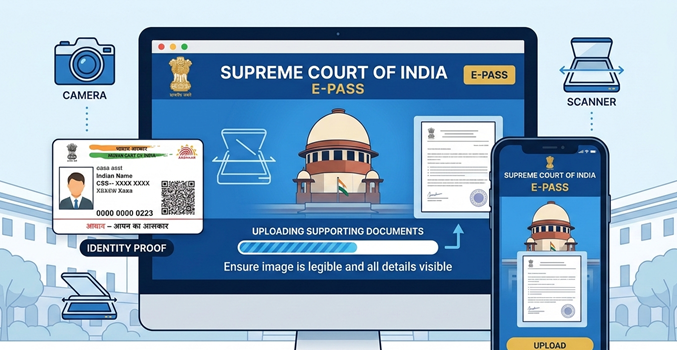
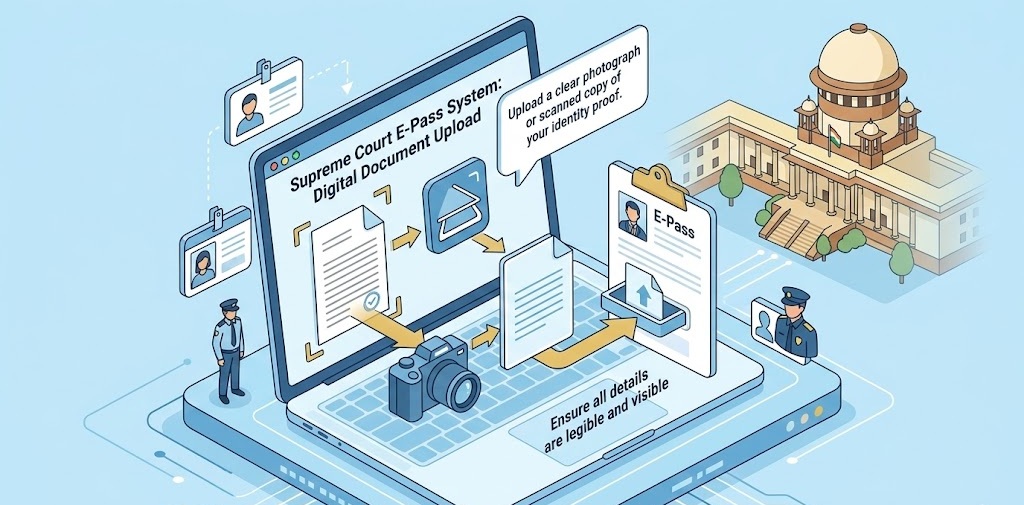
The E-Pass system requires digital copies of supporting documents. Typically, you must upload a scanned copy or clear photograph of your identity proof—the same document you referenced during registration. Ensure the image is legible, with all details clearly visible. Blurred, cropped, or unclear documents are common reasons for application delays.
Some categories of visitors might need additional documentation. For instance, law students may need to upload their institution’s ID card or a letter from their college. Journalists might require their press credentials. Researchers accessing the library could need a letter of introduction from their academic institution. Check the specific requirements based on your visitor category, as these details are usually outlined on the portal or can be confirmed through the court’s administrative contact points.
The portal specifies acceptable file formats (usually PDF, JPEG, or PNG) and size limits. Compress large files if necessary, but maintain readability. Upload each document in its designated field, double-checking that the correct file attaches to the correct category.
Review and Submission: The Final Check
Before hitting the submit button, review your entire application meticulously. Scroll through each section, verifying spellings, dates, document uploads, and contact details. Errors discovered after submission complicate the correction process and might necessitate reapplication, wasting valuable time.
Once satisfied, submit the application. The system generates an application reference number—write this down or screenshot it immediately. This number serves as your tracking ID for checking application status and resolving any queries with the administrative office.
The Waiting Period: Processing and Approval
After submission, your application enters the verification queue. The Supreme Court’s security and administrative staff review each application, cross-checking details against security databases and verifying document authenticity. Processing times vary based on application volume, typically ranging from a few hours to several working days.
During this period, monitor your registered email and mobile number for updates. The system sends notifications at key stages—application received, under review, approved, or rejected (with reasons). You can also log into the portal and check status using your application reference number.
If your application remains pending beyond the expected timeframe, or if you notice any status discrepancies, the portal usually provides contact information for the E-Pass administrative cell. Use these channels judiciously, providing your reference number and specific query for efficient resolution.
Receiving and Printing Your E-Pass
Upon approval, you receive confirmation via SMS and email containing your E-Pass details. Log into the portal to download the official pass document. This digital pass contains a unique QR code, your photograph, visit details, and validity period. Print this pass on standard A4 paper—color printing is preferable for clarity, though black and white is usually accepted if the QR code remains scannable.
The E-Pass is typically valid only for the specified date and duration. It cannot be transferred to another person or used for multiple entries beyond the authorized visit. Treat this document as you would any important official paper, keeping it safe and accessible for your court visit.
The Day of Visit: From Arrival to Entry
Reaching the Supreme Court Complex
Plan your journey to reach well before your scheduled time. The Supreme Court is located at Tilak Marg, New Delhi, easily accessible via metro (the nearest station is Pragati Maidan on the Blue Line), buses, taxis, or auto-rickshaws. Delhi’s traffic can be unpredictable, so buffer extra time, especially if traveling during peak hours.
Upon approaching the complex, you’ll notice the imposing gates and security presence. Multiple entry points exist, but visitors typically use designated gates clearly marked for public entry. Present yourself at the security checkpoint with your printed E-Pass and original identity proof—the same document you uploaded during application.
Security Screening: Standard Protocols
Security at the Supreme Court follows protocols comparable to airports and other high-security government installations. Your belongings, including bags, electronic devices, and personal items, pass through X-ray machines. You walk through metal detectors, and security personnel may conduct manual checks if necessary.
Certain items are prohibited inside the premises—these typically include weapons, sharp objects, recording devices (unless specifically authorized), and large bags. Travel light, carrying only essentials. Mobile phones are usually permitted but must be kept on silent mode inside courtrooms. Photography is strictly prohibited without explicit permission.
The security staff, though thorough, are generally courteous and professional. Cooperate fully with their instructions, answer any questions about your visit honestly, and present your documents when requested. Any confrontation or refusal to comply with security protocols can result in entry denial regardless of having a valid E-Pass.
Inside the Premises: Navigating with Respect
Once cleared through security, you’re inside one of India’s most important institutions. The E-Pass specifies areas you’re authorized to access—typically public corridors, visitor galleries in courtrooms, and the library (if separately approved). Stay within these designated zones. Attempting to enter restricted areas like judges’ chambers, administrative offices, or private corridors violates court protocols and can lead to immediate ejection or legal consequences.
If you wish to observe courtroom proceedings, check the daily cause list displayed on notice boards or available digitally. This list shows which cases are being heard in which courtrooms and at what times. Select a courtroom where proceedings are open to the public, enter quietly, and take a seat in the visitors’ gallery. Maintain absolute silence—whispering, phone usage, or disruptive behavior invites immediate removal.
The library, if included in your pass, offers access to legal texts, journals, and case reports. Follow all library rules regarding material handling, silence, and duration of stay. Some resources might require special permission or librarian assistance to access.
Special Considerations and Advanced Scenarios
Group Visits and Institutional Tours
Educational institutions often organize group visits for law students or political science students. While individual E-Passes remain the standard, group coordinators might need to initiate a bulk application process or coordinate multiple individual applications to ensure everyone receives clearance for the same date. Contacting the Supreme Court’s public relations or administrative office in advance helps streamline such visits, potentially arranging for a guide or briefing session about court functioning.
Frequent Visitors: Streamlining Repeat Applications
If you’re a researcher, journalist, or lawyer requiring regular access, the initial registration remains valid for future applications. You won’t need to re-enter all personal details—simply log in, apply for a new pass with updated visit dates, and submit. However, each visit requires a fresh E-Pass; the system doesn’t issue multi-entry or long-duration passes for general visitors. Some professional categories might have different arrangements, which can be explored through the court’s administration.
Technical Issues and Troubleshooting
Digital systems occasionally face glitches. If the portal doesn’t load, try clearing your browser cache, switching browsers, or attempting access during off-peak hours. If you encounter errors during form submission, check your internet connection and ensure all mandatory fields are completed. For persistent technical problems, the portal usually lists a technical support contact or helpline number.
Forgot your password? Use the “Forgot Password” feature on the login page, which sends a reset link to your registered email. If you’ve changed your mobile number or email since registration, updating these in your profile before applying for a new pass prevents communication gaps.
E-Filing Integration: The Broader Digital Ecosystem
While this guide focuses on visitor passes, it’s worth noting that the Supreme Court’s digital infrastructure extends far beyond entry management. The e-filing system represents a parallel digital revolution in how legal proceedings are initiated and managed. Lawyers and litigants can file cases, submit documents, pay fees, and track case status online through the e-filing portal, reducing physical visits to the court registry.
Though distinct from the E-Pass system, e-filing and electronic passes share the court’s commitment to accessibility and efficiency. For lawyers who file cases electronically and then need to attend hearings, both systems work in tandem—e-filing for case management and E-Pass for physical entry. Understanding this broader digital ecosystem helps visitors appreciate how technology is transforming India’s judicial processes, making justice more accessible while maintaining institutional dignity.
Frequently Asked Questions
Q: Can I visit the Supreme Court without prior online registration? A: No, walk-in entries are generally not permitted for security reasons. You must obtain an E-Pass through the official portal before your visit. Emergency exceptions might exist but require special authorization through proper channels.
Q: How far in advance should I apply for the E-Pass? A: Apply at least 3-5 working days before your intended visit to account for processing time. During high-profile case hearings or special events, apply even earlier as application volumes increase significantly.
Q: Is there any fee for obtaining the E-Pass? A: Currently, the Supreme Court does not charge fees for visitor E-Passes. The service is provided free of cost to encourage public access to judicial proceedings. Be wary of unofficial websites or agents claiming to charge fees for pass facilitation.
Q: What if my E-Pass application is rejected? A: Rejection reasons are usually communicated via email or visible on the portal. Common reasons include incomplete information, unclear documents, or security concerns. Rectify the issues and reapply, or contact the administrative office for clarification if the reason seems unclear.
Q: Can I modify my visit date after receiving the E-Pass? A: Generally, E-Passes are issued for specific dates and cannot be modified. If your plans change, you may need to apply for a new pass for your revised date. Check the portal for any “modify application” option before the approval stage; post-approval changes are rarely permitted.
Q: Are foreign nationals allowed to apply for visitor passes? A: Yes, foreign nationals can apply, but they might need to provide additional documentation such as passport copies and visa details. The process might involve additional verification steps, so foreign applicants should apply well in advance.
Q: What should I wear when visiting the Supreme Court? A: Dress formally and conservatively. Avoid casual wear like shorts, flip-flops, or revealing clothing. Business formal or traditional Indian formal attire is appropriate. Security personnel may deny entry to inappropriately dressed visitors even with valid passes.
Q: Can I bring my laptop or tablet for note-taking? A: Small electronic devices for personal use are usually allowed, but using them to record audio or video is strictly prohibited. Large electronic equipment might require special permission. When in doubt, travel without devices or seek prior clarification.
Q: Is there parking available for visitors? A: Limited parking might be available, but public transportation is strongly recommended given Delhi’s traffic and parking constraints near the court complex. If driving, arrive extra early to secure parking and complete security checks.
Q: How do I find out which cases are being heard on my visit date? A: The Supreme Court website publishes daily and weekly cause lists showing case schedules. These lists are available under the “Cause Lists” section of the main website, helping you plan which courtrooms to visit.
For More Update Visit Home Click Here
Short Disclaimer
This article provides general guidance based on publicly available information and standard procedures as of the publication date. The Supreme Court of India’s administrative policies, security protocols, and digital systems are subject to change without prior notice. Visitors are strongly advised to verify current requirements through the official website (https://epasses.sci.gov.in/) or by contacting the Supreme Court administration directly before planning their visit. The author and publisher assume no responsibility for entry denials, application rejections, or inconveniences arising from procedural changes, technical issues, or individual circumstances not covered in this general guide. This content is for informational purposes only and does not constitute legal advice or official representation of Supreme Court policies.
Bridging Citizens and the Constitution
The Supreme Court’s E-Pass system exemplifies how tradition and technology can coexist—preserving the dignity and security of India’s highest judicial institution while making it accessible to the citizens it serves. By understanding and following the outlined procedures, you transform from a distant observer to an active participant in the democratic process, witnessing firsthand how justice is administered at the apex level.
Whether you’re a law student taking your first steps toward legal practice, a citizen seeking to understand the judicial system, or a researcher delving into India’s constitutional evolution, your visit to the Supreme Court offers profound educational and civic value. The digital application process, requiring nothing more than internet access and proper documentation, democratizes access to this vital institution.
As you walk through those imposing gates, past the security checkpoints, and into the corridors where history is made daily, you carry with you the spirit of Article 39A of the Indian Constitution—ensuring that justice is not just done, but seen to be done. The E-Pass in your hand is more than an entry permit; it’s a tangible connection between the people of India and their highest court, facilitated by thoughtful digital innovation in service of democratic transparency.